Quick Answer
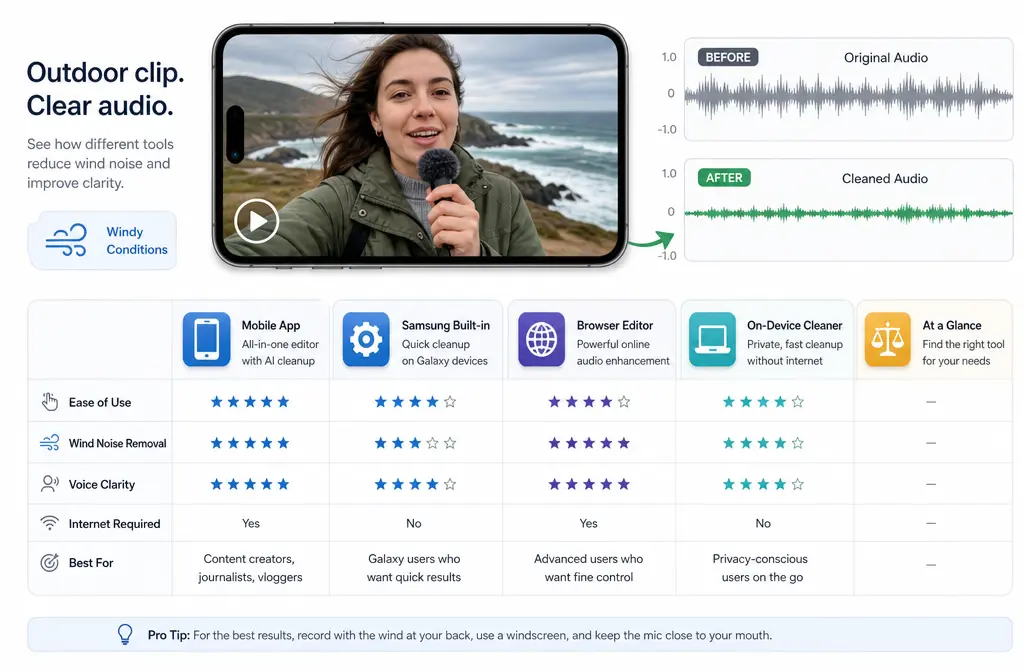
The best app to remove wind noise from video depends on how you work:
- Best overall for exported phone or camera video: a dedicated cleaner such as KLIN or Denoise, because both explicitly mention wind cleanup rather than only generic noise reduction.
- Best Samsung option: Samsung Audio Eraser, if your Galaxy device supports it.
- Best browser option: Descript, especially if you also want transcript-based editing and adjustable cleanup strength.
- Best for privacy-sensitive mobile workflows: on-device tools that say they work offline or on-device.
The key thing most buyers miss: wind is harder to fix than steady hiss or room noise. Light to moderate wind rumble can often be reduced. Severe gust buffeting, clipped audio, or speech buried under heavy wind may not be fully recoverable. Overdoing cleanup can also make speech sound metallic, watery, or muffled.
If you just need a fast exported-file workflow, you can also remove wind noise with SimpleClean after your video is already shot.
Why wind noise is harder than normal background noise
Wind noise is not just “more background noise.” Technical audio tools treat it as a more specialized problem because gusts and buffeting are often irregular and low-frequency, unlike steady hiss or a constant fan. iZotope’s RX documentation specifically separates de-wind style problems from broader denoise tasks and warns that heavy processing can hurt speech quality if pushed too far.
In plain English, that means:
- Steady noise is usually easier for AI or filters to identify.
- Intermittent gusts can overlap with your voice in messy ways.
- Severe mic buffeting may distort the recording itself, which no app can fully restore.
- Aggressive cleanup may remove some wind but also thin out consonants and make speech sound underwater.
That is why the best app to remove wind noise from video is usually one that explicitly mentions wind in its feature list, not just “background noise removal.”
Best apps and tools by workflow
| Tool | Best for | Why it stands out | Main tradeoff |
|---|---|---|---|
| KLIN | Quick cleanup of exported video on Apple devices | Official listing says it removes wind, hum, and background noise; supports import from Photos/Files, export back to Photos, works offline, and positions itself around no-watermark export | App-store listing gives less guidance on how aggressive cleanup affects speech |
| Denoise | On-device mobile cleanup across iPhone, iPad, and Android | Official site says its neural network runs on-device and handles wind, traffic, hiss, hum, and crowd noise | Less of a full editor workflow than browser editing tools |
| Samsung Audio Eraser | Galaxy users who want a built-in fix | Samsung says it can identify and adjust sounds such as voices, wind, noise, crowd, and nature | Only available on select Galaxy devices with Android 14 / One UI 6.1 or higher |
| Descript | Browser cleanup plus editing and transcription | Official pages say Studio Sound can reduce wind, traffic, hiss, static, and echo/reverb, with intensity control and preview before export | More editor-centric than pure one-tap mobile cleanup |
Best overall for most people: a dedicated cleaner that clearly lists wind removal, especially if your video is already exported as MP4 or MOV and you do not want to re-edit the whole project.
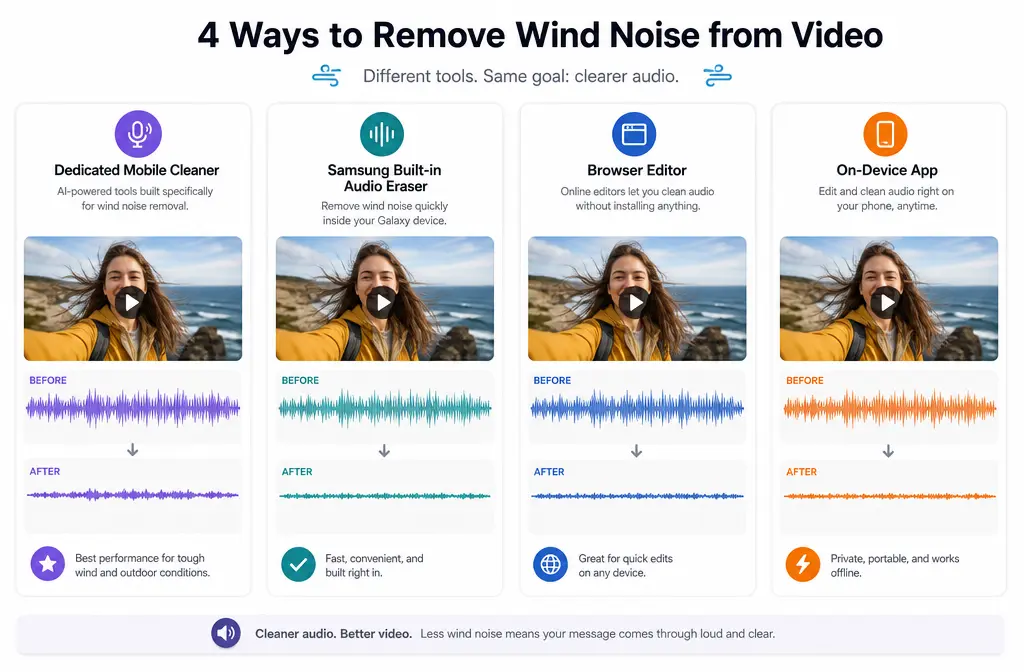
Best overall app for exported phone or camera video
If your clip is already shot and saved to your phone or computer, the safest recommendation is a dedicated video-audio cleaner rather than a generic editor filter.
KLIN is a strong fit for this use case based on its App Store listing. Apple’s listing says KLIN removes wind, hum, and background noise, lets you import video from Photos and Files, export back to Photos, works offline, and emphasizes no-watermark positioning. That combination fits a very common rescue workflow: open a noisy outdoor clip, preview a cleanup, export a fixed version, and keep moving.
Denoise is another strong option if you want on-device processing across platforms. Its official site says it uses an on-device neural network to clean wind, traffic, hiss, hum, and crowd noise on iPhone, iPad, and Android. If privacy matters, that on-device framing is meaningful because it avoids a browser-upload-first workflow.
Best for:
- Creators cleaning a single MP4 or MOV after filming
- Vloggers fixing outdoor talking-head clips
- People who do not need a full timeline editor
- Users who prefer on-device or offline cleanup
What to watch for:
- Preview whether the app is reducing wind, not just raising voice loudness
- Compare a light pass versus a heavy pass on headphones
- Listen for watery or metallic artifacts in words like “s,” “f,” and “t”
If you want a simple exported-file workflow in the same spirit, SimpleClean is worth considering for quick wind-noise cleanup without rebuilding your edit.
Best built-in option for Samsung users
If you have a supported Galaxy device, Samsung Audio Eraser is the most convenient first thing to try. Samsung’s support pages say Audio Eraser can identify and adjust sounds such as voices, wind, noise, crowd, and nature. Samsung also notes that availability depends on select Galaxy devices running Android 14 with One UI 6.1 or higher.
That makes Audio Eraser the best answer for Samsung owners who want:
- No extra app install
- A built-in Gallery workflow
- A quick fix before posting
But Samsung is not automatically the best answer for every windy clip. If the result sounds overprocessed, or if you need a file-based workflow after exporting from another editor, a separate cleaner may still be the better move.
For a deeper Galaxy-specific walkthrough, see how to remove background noise on Samsung video with Audio Eraser.
Best browser option if you do not want to install software
Descript is the strongest browser-style recommendation in this set, especially if your windy video also needs editing. Descript’s official pages say Studio Sound can remove or reduce wind, traffic, hiss, static, and echo/reverb. It also offers an intensity slider and a preview-before-export workflow.
Those two details matter a lot for wind:
- Intensity control helps you stop before speech starts sounding synthetic.
- Previewing first helps you judge whether the clip is truly salvageable before you commit time.
Best for:
- Creators who also need transcripts
- Teams cleaning clips in a browser
- Editors who want to remove wind and then cut by text
If transcription is part of your workflow, Descript fits naturally. If you also want polished on-screen subtitles after cleanup, Best AI Captions can help add captions and subtitles to the finished video.
Best choice if you also need transcript or video editing
If wind cleanup is only one step in a larger post-production workflow, Descript is the best fit from this research set because it combines cleanup with transcript-based editing.
A dedicated cleaner is usually faster for a one-off rescue. But Descript becomes more attractive when you also need to:
- Edit spoken content
- Trim pauses or retakes
- Create social clips from the transcript
- Export polished versions for multiple channels
After you clean the audio, you can expand the video’s reach with Translate Dub if you want translated, dubbed, and captioned versions for multilingual audiences. And if the next step is scheduling or cross-platform publishing, Mallary.ai fits naturally for distributing cleaned clips across social platforms and managing publishing from one workflow.

What to test before paying
Before you commit to any app, test the things that actually matter for wind rescue:
- Preview quality: Can you hear a real reduction in rumble or gusts?
- Intensity control: Is there a way to keep cleanup light, or is it all-or-nothing?
- Export workflow: Can you get the cleaned file back into Photos, Files, or your editor easily?
- Watermark policy: If the tool advertises watermark-free export, confirm that on your own sample clip.
- Offline or on-device processing: Important if you handle private recordings.
- Supported device path: Samsung Audio Eraser only applies if your Galaxy device supports it.
This is also where a quick browser test can be helpful. If you just want to compare before choosing a permanent workflow, try a short sample in Descript or a dedicated cleaner and judge the result on headphones.
How to judge results: clarity vs artifacts
The best result is not the clip with the least background noise. It is the clip where speech stays intelligible and natural enough to use.
Listen for these tradeoffs:
- Good result: voice is clearer, wind rumble is reduced, words are easier to understand
- Overprocessed result: voice sounds underwater, metallic, phasey, or strangely hollow
- Failed rescue: wind still masks key words, or cleanup destroys the voice more than it helps
A practical rule: if a light pass makes the clip better, stop there. Chasing “perfect silence” often makes windy speech sound worse.
When apps can rescue wind, and when they cannot
Apps can often help when:
- The speaker is already somewhat understandable
- The wind is moderate rather than explosive
- The clip has low-frequency rumble more than full-spectrum distortion
- You can apply a mild or moderate cleanup instead of a max-strength pass
Apps may not fully save the clip when:
- Wind buffeting overwhelms the mic
- The audio is clipped or distorted at the recording stage
- Speech is buried under severe gusts
- Every stronger pass makes the voice mushy or robotic
In those worst cases, the app is not failing so much as revealing a recording limit. Prevention still matters: use a windscreen, shield the mic from direct gusts, and change mic placement when possible.
A 60-second workflow to remove wind noise from video
- Duplicate the original clip. Keep one untouched copy.
- Import the duplicate into your chosen tool. Use a dedicated cleaner, Samsung Audio Eraser, or Descript depending on your device.
- Start with light cleanup. Do not jump straight to the strongest setting.
- Preview on headphones. Check speech, not just the background.
- Export and compare. A/B the cleaned file against the original.
- Keep the version with better intelligibility. Slight remaining wind is often better than artificial speech.
If your existing editing app cannot fix the wind cleanly, exporting the MP4 or MOV and using a dedicated post-fix tool is often faster than re-editing your entire project.
Best-for verdicts
- Best iPhone app to remove wind noise from video: a dedicated cleaner such as KLIN if you want a fast Photos/Files import-export workflow, or Denoise if you want on-device processing.
- Best Android app to remove wind noise from video: Denoise is the clearest cross-device pick from the provided research because it explicitly mentions Android and on-device wind cleanup.
- Best Samsung Galaxy option: Audio Eraser, if your supported Galaxy device has it.
- Best browser tool: Descript.
- Best for exported MP4/MOV cleanup without full re-editing: a dedicated cleaner focused on wind, or clean windy video audio with SimpleClean after export.
FAQ
Can wind noise really be removed from a video?
Often reduced, yes. Fully removed, not always. Mild to moderate wind can be improved, but severe gust buffeting, clipped audio, and buried speech may remain partly damaged.
What is the best iPhone app to remove wind noise from video?
From the supplied sources, KLIN is a strong iPhone-focused option because its App Store listing explicitly mentions wind removal, offline use, and import/export through Photos and Files. Denoise is also a strong iPhone choice if you prefer on-device neural-network cleanup.
What is the best Android app to remove wind noise from video?
Denoise is the clearest Android recommendation in this source set because its official site explicitly says it works on Android and handles wind noise on-device. Samsung users should also check whether Audio Eraser is available on their Galaxy device.
Can CapCut remove wind noise from video?
This article does not make a direct CapCut capability claim because that was not supported in the provided source set. If you specifically need a wind-focused answer, choose a tool here that explicitly mentions wind handling.
How do I remove wind noise from an MP4 without re-editing the whole video?
Export the finished MP4, duplicate it, run a light cleanup pass in a dedicated cleaner or browser tool, then compare the cleaned file against the original on headphones.
Why does noise reduction make my voice sound underwater?
Because aggressive denoise can remove parts of the speech signal along with the wind. This is a known tradeoff in audio cleanup, especially with difficult intermittent noise like gusts.
Is Samsung Audio Eraser better than a separate noise-removal app?
It is better for convenience if your Galaxy supports it. A separate app may still be better if you want a cross-platform workflow, stronger file-based cleanup options, or on-device/offline processing outside Samsung’s Gallery workflow.
Final takeaway
If you are choosing the best app to remove wind noise from video, start with the workflow, not the brand name. Use Samsung Audio Eraser if you already have a supported Galaxy device. Use Descript if you also need editing and transcripts. Use a dedicated cleaner like KLIN or Denoise if you want the fastest rescue path for exported MP4 or MOV files and you specifically need wind handling.
And whatever tool you choose, judge success by clearer speech, not by whether every trace of outdoor sound disappears.
Sources and further reading
- KLIN: AI Video Sound Cleaner App Store listing - Official feature list for wind/background noise removal, offline use, import/export, and no-watermark positioning.
- Use Audio eraser on Samsung phones and tablets - Official support doc confirming Audio Eraser can target or adjust wind and other sounds, plus supported-device framing.
- Use features with Galaxy AI on your Galaxy phone and tablet - Official Samsung support page describing Audio Eraser as identifying and eliminating sounds such as voices and wind.
- Denoise official site - Official product page stating on-device neural-network cleanup for wind, traffic, hiss, hum, and crowd noise on iPhone, iPad, and Android.
- Remove Wind From Your Video for Free Online | Descript - Official wind-removal landing page for a browser/editor workflow and plan context.
- Free Background Noise Remover Tool - Descript - Official page confirming Studio Sound handles wind, traffic, hiss, static, echo/reverb, and includes an intensity slider plus preview-before-export workflow.
- How to Remove Background Noise From Video & Audio | Riverside - Background reference for general video-audio cleanup context and contrast with wind-specific cleanup.
- iZotope RX De-wind module PDF - Technical reference for why intermittent wind is a specialized cleanup problem and why over-processing can muffle speech.